Certified AI Coworker

The

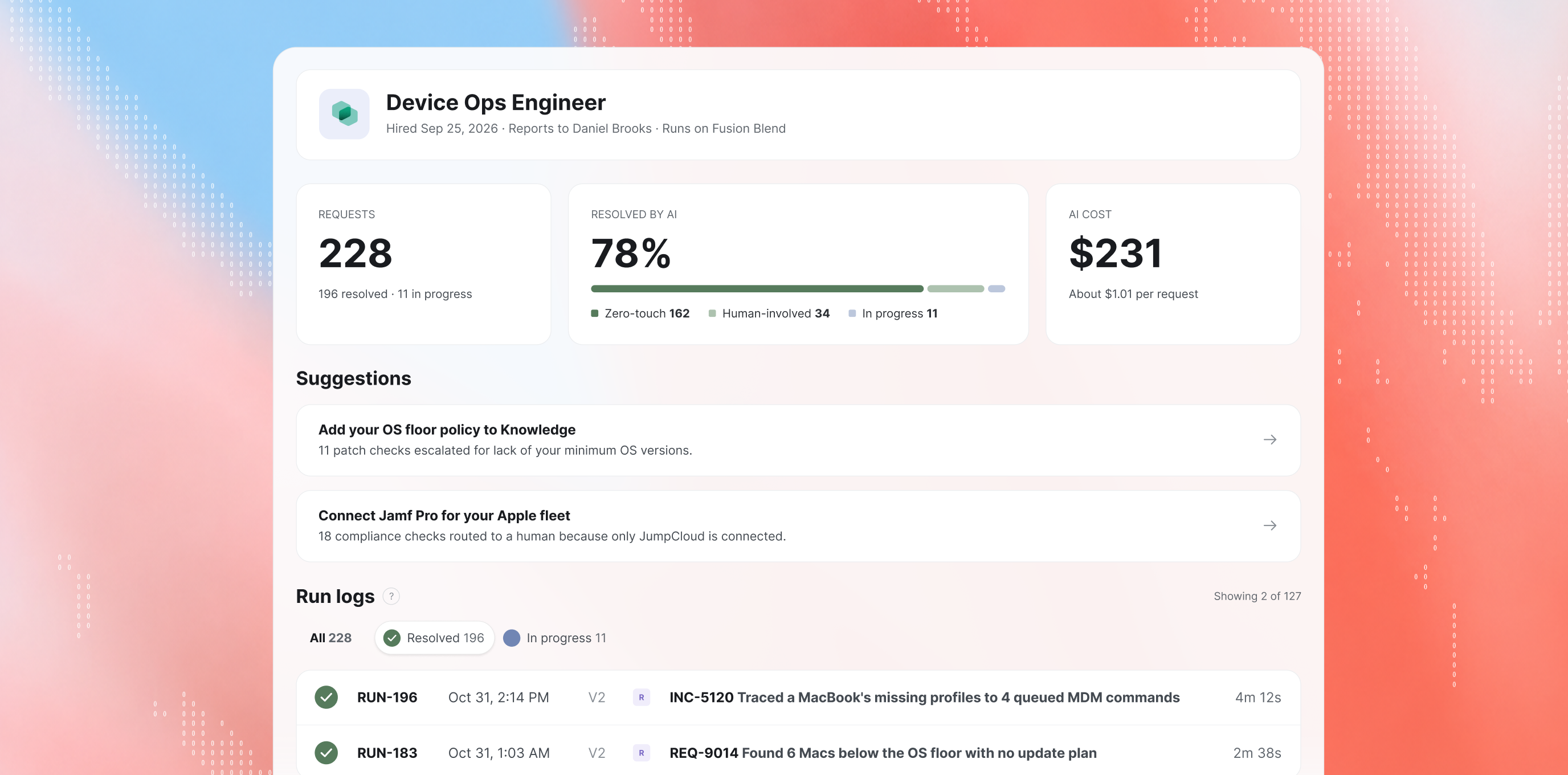
Device Ops Engineer manages your fleet so your team stops chasing laptops.

The AI Coworker that triages device health, checks compliance against your policies, and tracks patch and OS currency, so IT is always one step ahead of issues.

Verified stack coverage

Every device in your managed fleet, accounted for.

01
Connect your stack
02
Diagnose the problem
03
Run the matching playbook

Health, compliance and patching for your entire Apple fleet

Mixed-fleet health and compliance, across Mac, Windows or Linux

Blast radius visibility across owners, apps, dependencies, and services

Windows endpoints, compliance policies and app deployments

What it owns

Your fleet’s first responder.

The Device Ops Engineer handles day-to-day endpoint management. It works out why a laptop went quiet, which compliance policy didn’t apply and which OS update is missing, then fixes what it’s cleared to.
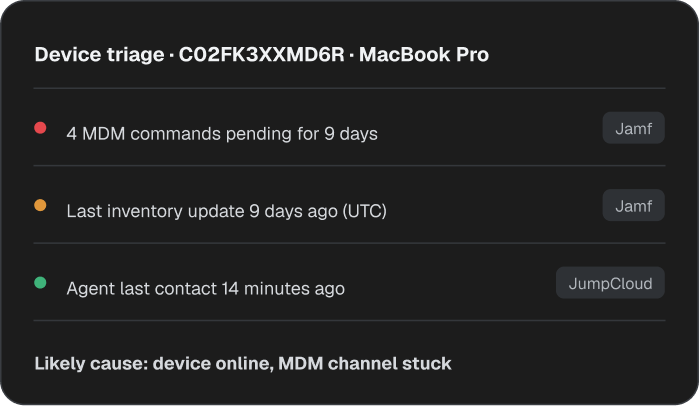
Finds out why a device went quiet.
Reads MDM inventory, check-in and command history, and open tickets. Then tells you whether the laptop is offline or the MDM connection is broken.
Says what it can't check.
Lists every platform reached and every check run, so a clean report actually means nothing’s wrong.
Tells you how old the data is.
Quotes which timestamp it read, last check-in or last inventory, in UTC. Nobody chases a problem that was already fixed.
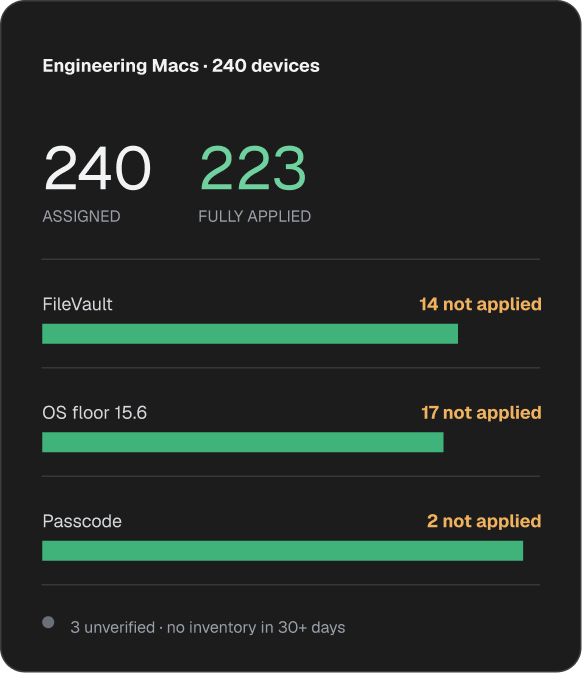
Separates assigned policies from applied.
Checks every device for disk encryption, OS version and passcode. Shows which policies actually took effect, and flags devices it can’t verify. 
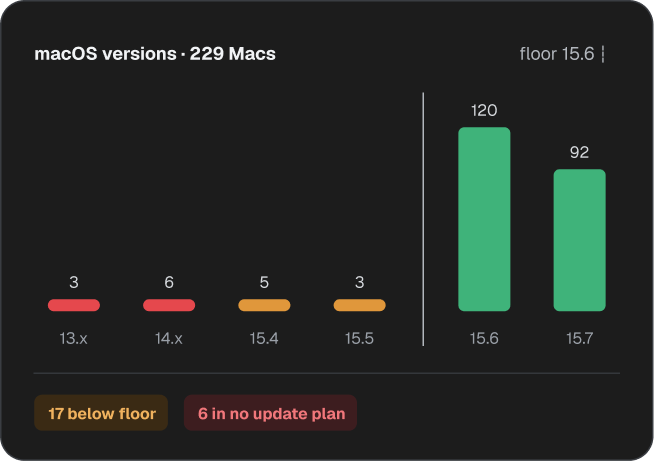
Names the exact update that’s missing.
Checks OS versions, update plan coverage and third-party patch titles. Catches unsupported devices before they become the problem.
Releases recovery keys only to the right person.
Confirms every device has a recovery key on file, and releases it only to a verified owner.
The playbook

Fixes what it can. Escalates what it should.

The Device Ops Engineer reads the MDM signals, works out what’s wrong, and takes next steps within its operating principles.

From its TICKET LOG

A normal Tuesday for the Device Ops Engineer.

See how it handles a device ticket, from the first report to the root cause and the fix.

Employee reports Mac has slowed to a crawl
Pulled the Mac’s JumpCloud record: checked in 4 minutes ago, disk 97% full, memory normal. Ruled out a hardware fault, traced it to 38 GB of caches and sent the cleanup steps to the employee.
[ OUTCOME ]
Back up to speed with a 2-minute fix.
Laptop with client files on it is left in a cab
Confirmed the Mac in Jamf: last checked in 20 minutes earlier, FileVault on. Alerted SecOps with device details and last known location. Remote lock and wipe request sent to the IT lead for approval.
[ OUTCOME ]
Locked down before it could reach the wrong hands.
Some Macs still on an old macOS a day after critical update
Checked every Mac’s OS version in Jamf Pro. 17 were below 15.6, and 6 of those weren’t in any update plan. Sent the list to the IT lead for approval to add them.
[ OUTCOME ]
Blind spots surfaced on day 1 of the patch.
A Windows laptop is flagged non-compliant and loses access to email
Found the failing rule in Intune: BitLocker had been suspended after a firmware update, which blocked email. Sent the IT lead approval to resume encryption and resync the laptop.
[ OUTCOME ]
Compliant and back to work within the hour.
BENCH TESTED
Tested across real device fleets before it reaches yours.
310+
scenarios tested
Device-specific, multi-turn conversations
34
GRADERS PER SCENARIO
Scoring accuracy, scope, safety
3
CERTIFIED MDM PLATFORMs
Jamf Pro, JumpCloud, Intune
5+
DOMAINS COVERED
Device health, Compliance, Patching, Software inventory
Built-in oversight

Governed like the rest of your team.

Reporting manager

All escalations route through them. Adjust scope and permissions anytime.

Budget controls

Monthly spend cap with full cost-per-investigation visibility. Every dollar accounted for.

Audit trail

Every action logged with full context. See what it checked, found, and skipped.

Drift detection

Flags when behavior drifts from your rules. Patterns surface before they become problems.

Frequently asked questions

Which MDM platforms does the Device Ops Engineer support?
Chevron navigation icon on Atomicwork website

Jamf Pro, JumpCloud and Microsoft Intune. It detects which of them it can reach before every investigation and works with whichever you’ve connected.

Can the Device Ops Engineer make changes to my devices?
Chevron navigation icon on Atomicwork website

Yes, within the limits you set. Low-risk fixes, like clearing caches or unlocking an account, run once the employee agrees. Disruptive ones, like restarts or OS updates, run at a time the employee chooses. Locking, wiping or suspending always can require approval from a manager or IT lead.

Does the Device Ops Engineer work the same on all MDMs?
Chevron navigation icon on Atomicwork website

It runs the same playbook everywhere: identify the device, diagnose, fix, verify. The checks available vary by platform, and it tells you upfront what it covered on each. Jamf goes deepest on Apple devices, JumpCloud spans Mac, Windows and Linux, and Intune covers the Windows fleet. If a check isn’t available on a platform, it says so and routes that part to someone with console access.

Can the Device Ops Engineer access FileVault recovery keys or local admin passwords?
Chevron navigation icon on Atomicwork website

It can do so for verified recovery cases. Releasing a FileVault or BitLocker key needs a strong identity check, every release is logged, and the key is never written into the ticket.

Can the Device Ops Engineer detect device compliance and patch management issues?
Chevron navigation icon on Atomicwork website

Yes. It checks device encryption, OS versions, passcode status, policy application, and patch currency against available MDM data. It identifies missing updates, unsupported devices, and compliance gaps, while flagging devices it cannot verify because of stale data or limited platform access.