How Atomicwork built its AI workflow engine with Claude Agent SDK & MCP

"When a new employee starts, create their Okta account, provision Office 365, add them to their department's Slack channels, assign a laptop in asset management, and create their onboarding checklist."
In traditional workflow builders, this sentence becomes 45 minutes of clicking through nested configuration modals across six different systems. In workflow-as-code platforms, it requires understanding each system's API, schema mappings, authentication flows, and writing error-free JavaScript code — technical expertise most service teams don't have.
Automation builders end up being a unique challenge due to these constraints:
- They have to tune into the organizational context as defined by fields and forms.
- They have to follow complex conditional logic as organizational processes tend to do.
- They have to enable orchestration across multiple systems.
- They have to constantly evolve to stay in sync with organizational context. Workflows that were correct last month break when “Sales Engineering West” becomes “Solutions Architecture – Americas”.
In Atomicwork, these automations become a deployed workflow in a couple of minutes with our AI workflow builder — complete with visual workflow graphs rendered on canvas AND structured workflow-as-code validated against live platform schemas. Thus making the process of workflow creation easy for both technical and non-technical teams.
Same input, both outputs. No translation layer or engineering bottleneck.
And we did it all with Claude Code and a couple of engineers in a couple of weeks.
This is how we did it.
From one prompt to agent swarm
Our first attempt was the obvious solution: send the user prompt to Claude with the platformʼs schema and ask it to generate the workflow definition directly. The results were creative but unreliable; field mappings would be plausible but wrong. It referenced field names that didnʼt exist, or used string values where the platform expected real field IDs.
We discovered quickly that the core issue is that translating natural language to a deployed workflow involves at least six distinct sub-problems:
A single-shot LLM invocation doesn’t do the trick because it cannot optimize simultaneously for creative intent interpretation and deterministic field-level precision. Intent reasoning demands exploration and flexibility, whereas code generation requires exactness and reproducibility which are fundamentally competing optimization objectives.
So, we decomposed the problem into specialized agents built on the Claude Agent SDK, each handling the sub-problem it is best suited for. The Agent SDK gives us the orchestration layer — tool registration, conversation management, and agent-to-agent handoffs — while agents interact with the platform through tools built on MCP (Model Context Protocol) for runtime tool discovery and invocation. The pipeline has feedback loops, a human checkpoint, and self-correction paths.
Claude from prompt to production
Before we get into architecture, it’s worth looking at what actually happens when Atomicwork sees this prompt:
“When a new employee starts, create their Okta account, provision Office 365, add them to their department's Slack channels, assign a laptop in asset management, and create their onboarding checklist.”
Atomicwork doesn’t just produce a paragraph of text in response. Using the Claude Agent SDK and tool use API, it decomposes the request into discrete intents, queries live MCP tools to introspect available triggers and actions, inspects required schemas and field types, and constructs a typed execution plan with explicit dependencies and branching logic.
Within seconds, it generates a structured architectural blueprint, not yet code, but a machine-verifiable plan grounded in the platform’s current state. This isn’t static prompting. It’s reasoning over dynamic enterprise infrastructure and producing structured intermediate representations before any workflow definition is built.
That shift from “LLM as autocomplete” to “LLM as structured planner over live systems” is what made natural-language workflow generation viable.
We developed the system using Claude Code, Anthropic’s agentic coding CLI. CLAUDE.md files served as living architectural memory, encoding conventions and deployment patterns so each session compounded prior decisions instead of resetting context. For major changes, we ran parallel Claude Code agents against the same diff evaluating AI logic, backend architecture, infrastructure configuration, and security from different angles. We even experimented with “developer twin” agents that reflected individual engineers’ coding patterns, surfacing architectural drift that generic linting would miss.
The same reasoning engine that translates natural language into executable workflows also accelerated the design, review, and iteration of the system itself creating a feedback loop between product intelligence and engineering velocity.
Type-safe, tenant-specific SDKs: Making tool use reliable at enterprise scale
MCP gives us a standard way to discover tools and their schemas at runtime. But once you move from demos to production, you hit a practical problem: enterprise automation isn’t one platform state. It’s hundreds of tenant states. Different integrations enabled, different custom fields, different credentials, different endpoints, sometimes different versions of the same system.
So we introduced an additional layer that became critical to making natural-language workflow generation reliable: type-safe SDK bundles generated per tenant configuration.
Here’s the core idea:
- MCP servers are self-describing. They expose tool definitions (names, descriptions, JSON schemas for inputs and outputs).
- We run an SDK generation pipeline that connects to the MCP servers configured for a tenant, discovers available tools, and generates a TypeScript SDK: typed method signatures, parameter interfaces, and IDE/autocomplete metadata.
That SDK is bundled with the tenant’s configuration, so execution is isolated by design. Tenant A’s bundle can only talk to Tenant A’s servers, using Tenant A’s credentials and endpoints. There’s no runtime routing table and no shared state.
This does two important things for the workflow experience:
- It makes agents precise instead of “plausible.” Early on, we ended up with workflows that looked right but referenced fields or values that didn’t exist. With a typed SDK derived from live schemas, the agent writes against a contract: it knows exactly what methods exist and what parameter types they accept.
- It makes execution safe and scalable. The generated code runs in an isolated sandbox with the tenant’s SDK bundle. The sandbox can call MCP tools on behalf of the tenant without exposing raw credentials or requiring custom per-tenant code.
In practice, the system becomes a three-phase pipeline that can scale to hundreds of tenants cleanly:
- SDK Generation (per configuration change): discover tools → generate types → bundle tenant config
- Code/Plan Generation (on demand): Claude reasons using typed capabilities
- Sandbox Execution (per run): execute isolated code with the tenant’s SDK bundle
This is the piece that turns “LLM tool use” into “LLM tool use that survives enterprise drift.” When an MCP server adds a new tool or a tenant changes their configuration, the next SDK generation cycle picks it up automatically - no manual SDK updates, no schema drift, no guessing.
The agent pipeline
Discovery: Building the capability map
When a user types a prompt, before any AI reasoning happens, two agents kick off in parallel to answer a simple question. What can this platform do, and what has this specific organization customized in Atomicwork?
The Platform Discovery Agent fetches the platformʼs native capabilities at runtime through MCP tools like available actions (classify with AI, update field) and triggers (event-based, scheduled). When the agent calls a schema introspection tool for “update field,” it fetches the required fields, optional fields, data types, valid operators, and acceptable values. This is what lets the planner know that “set priority” expects an enum ID, not free text.
## Execution Plan

### Goal
Retrieve all open tickets assigned to the current user.

### Available Functions
- `AtomicworkMcpServer.getcurrentuser`: Gets the current user's details
- `AtomicworkMcpServer.getrequestsbyfilter`: Filters and retrieves requests

### Import Statements
```javascript
import { servers } from '@generative-workflows/sdk/integrations';
import { WorkflowSDK } from '@generative-workflows/sdk/core';
```
The Context Discovery agent runs in parallel, analyzing the tenant’s configuration to extract all schema definitions along with their types and valid options. Because business logic often lives in these custom fields, organizations with hundreds of them introduce significant combinatorial complexity that the Planner Agent would otherwise need to reason through. What began as an afterthought evolved into a critical pipeline stage, as pre-structuring this context became essential to managing that complexity.
These components execute concurrently since they are independent, yet both must complete before planning can begin. The Planner Agent requires a complete view of the system, the platform’s native capabilities as well as the specific customizations configured for that tenant. Without the custom field discovery stage, the system would be unable to reason about instructions like “Set the Region to APAC,” because that field may exist only within that tenant’s configuration.
Running discovery agents in parallel reduced startup latency by approximately 50% across organizations with hundreds of custom fields — the total time is bound by the slower agent rather than the sum of both. Since neither agent depends on the other, concurrent execution was relatively straightforward and a quick performance win.
Planning: From intent to architecture
With the user prompt and the full capability map, the Planner Agent uses Claudeʼs tool use API to compose a structured plan through iterative tool calls. It identifies which action types match the userʼs intent, inspects the schema for each selected action to understand what data it needs, and composes a tree-structured plan with branching support — mapping user intent to specific action types and their configurations.
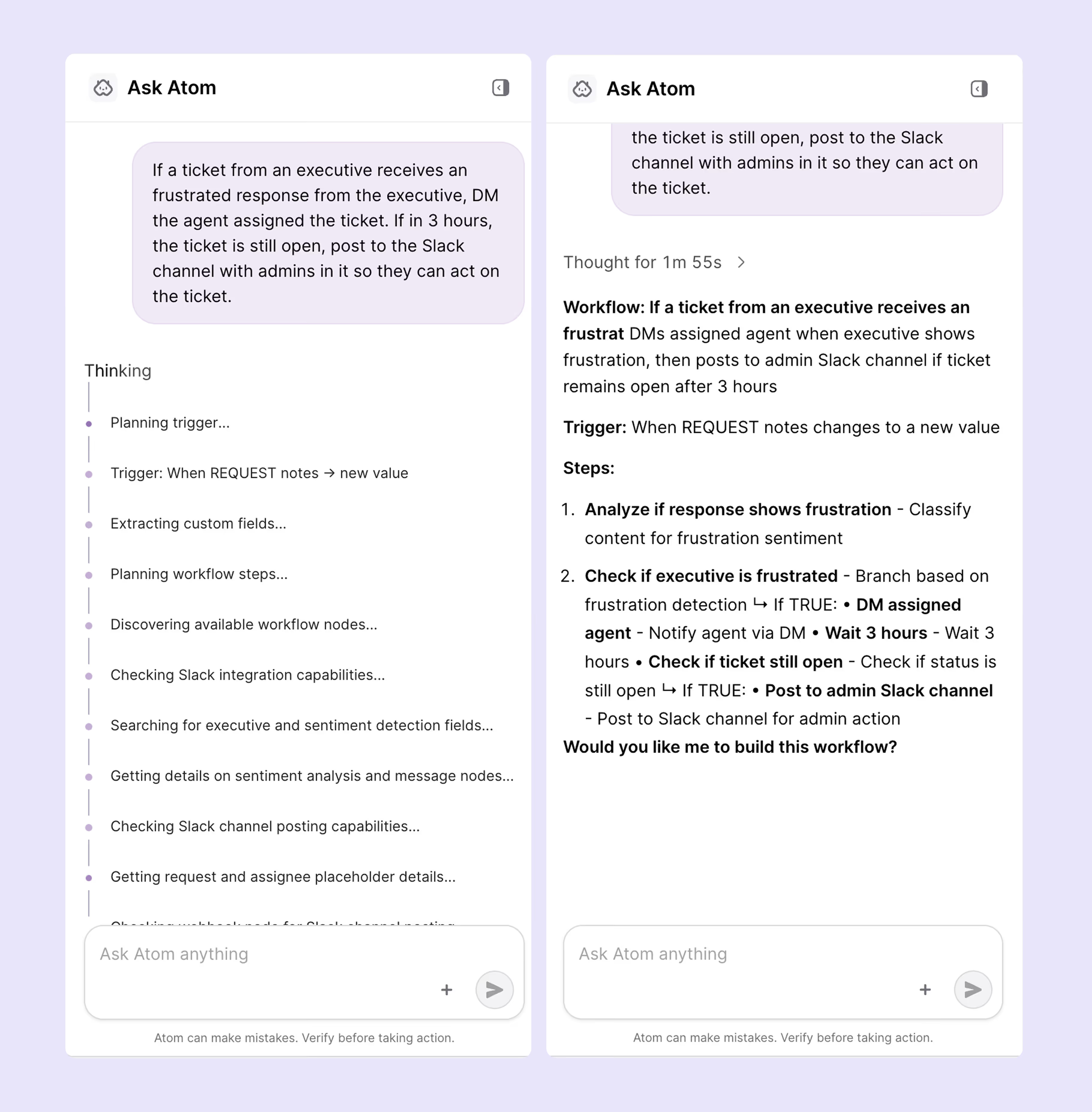
The output is an architectural blueprint — not code yet, but a structured description of what the workflow will do. The user reviews this plan and can approve, reject, or request changes.
We considered fully autonomous generation but found that users wanted to validate the logic before committing to the plan.
Collection: Turning names into identifiers
Plans speak in human relatable terms. Platforms speak in identifiers.
The Identifiers Agent bridges this gap through lookup tools — resolving “network team” to a team ID or “high priority” to a priority enum value.
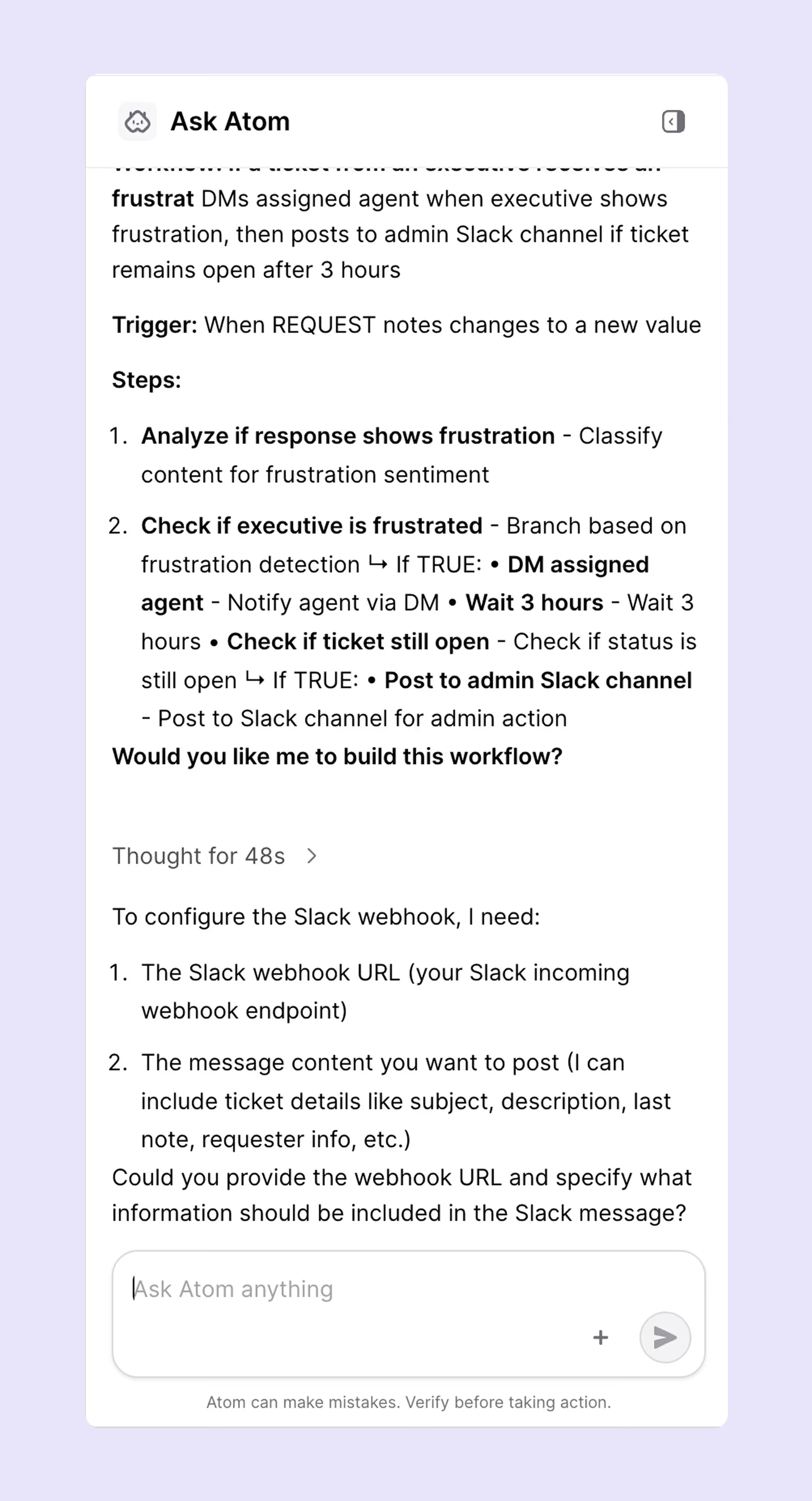
Identifiers Agent reasons about which tool to call for each field based on the user, asset or request’s metadata. The resolution logic is emergent from tool availability and schema structure, not hardcoded.
The interesting cases ended up being the most ambiguous ones. “Network team” might match both “Network Support” and “Network Infrastructure.” Rather than defaulting to the closest match, the Identifiers Agent asks the user to clarify.
Building: deterministic, dual output
The workflow builder is entirely deterministic. Given the same plan and resolved data, it always produces the same output.
**Phase 3 – Generated Code (workflow.js):**
```javascript
import { servers } from '@generative-workflows/sdk/integrations';
import { WorkflowSDK } from '@generative-workflows/sdk/core';

async function main() {
    const { AtomicworkMcpServer } = new WorkflowSDK({ servers });

    // Step 1: Get the current user's details
    const currentUser = await AtomicworkMcpServer.getcurrentuser({});
    const userId = currentUser.data.userId;

    // Step 2: Get all open tickets assigned to the current user
    const ticketsResponse = await AtomicworkMcpServer.getrequestsbyfilter({
        filter: {
            assignee: userId,
            status: ["open", "in_progress"]
        }
    });

    // Return the tickets (data.data contains the array)
    return {
        success: true,
        user: currentUser.data,
        tickets: ticketsResponse.data.data,
        count: ticketsResponse.data.data.length
    };
}

return await main();
```
We arrived at this through hard lessons. Early versions used Claude for code generation,and the outputs were subtly nondeterministic. Each individual output looked correct; the inconsistency only surfaced when comparing outputs across runs. A field mapped slightly differently between runs. A condition expressed in an unexpected order.
We handled plan and build validation through a Validator Agent that checked structural integrity:
- Graph correctness (are all nodes reachable?),
- Required schema,
- Type constraints,
- Logical consistency (do conditional branches reference valid upstream outputs?)
- Nodes, conditions and triggers
The Validator Agent cross-checks the output against the platformʼs current schemas to catch any differences between what the planner had assumed and what the platform currently accepts.
In the event of an issue, it routes the error back to the right upstream agent with specific correction instructions. A missing field goes back to the Identifiers Agent. A structural issue goes back to the Planner Agent. This design enables the pipeline to iteratively correct errors at the appropriate stage, ensuring resilience and recovery instead of failing outright at the first sign of inconsistency.
Each agent also runs a self-correcting loop. When a tool call fails, the system classifies the error — transient failure, invalid input— and injects a structured correction hint into the agentʼs next reasoning step:
“You searched for ‘wifi teamʼ but no match was found. Try broader terms like ‘networkʼ or ask the user which team handles wifi issues.”
Each failure makes the next attempt more targeted. We cap retries with loop detection that stops after repeated identical errors, with a fallback to asking the user for help. Without this, an agent searching for a team that doesnʼt exist would cycle through increasingly creative search terms indefinitely.
By designing the builder as a pure deterministic transformation and introducing a dedicated Validator Agent, we significantly reduced an entire class of subtle and hard-to-diagnose bugs.
Two representations are produced in a single pass:
- Visual workflow graph - A DAG of nodes and edges. Users see their workflow as connected boxes with branching paths, trigger configurations, and action details — the same visual language theyʼd get from a drag-and drop builder, generated instantly.
- Workflow-as-code - A structured code definition with trigger configuration, node definitions, field mappings, and conditional logic.
Both representations derive from the same plan, so theyʼre always in sync.
Making it durable
AI-powered pipelines have practical reliability problems like
- API calls can fail.
- Model responses can vary.
- Users can walk away mid conversation and come back hours later to provide input.
To tackle this, we run the pipeline on Temporal, a durable execution framework. Each agent runs as its own Temporal workflow with independent retry policies and failure isolation. If one agent fails, only that agent retries — previous stages are preserved.
The pattern that matters most is signal-based human-in-the-loop. When the planner produces a plan and needs user approval, the Temporal workflow pauses durably using signals. The process can restart, the pod can be replaced, the deployment can roll — the pause survives all of it. When the user responds minutes or hours later, execution resumes exactly where it left off.
We now persist state after every stage of the pipeline, allowing users to refresh their browser and seamlessly resume with their full conversation history, plan, and progress intact. While this seems straightforward in hindsight, our initial reliance on in-memory state meant that every deployment erased active sessions. Introducing durable checkpointing earlier would have prevented significant rework and lost time.
Conclusion
Workflow automation shouldnʼt require choosing between accessibility, visual clarity, and engineering rigor. Natural language gives users the ability to describe what they want. Visual workflow graphs give immediate understanding. Workflow-as-code gives teams the ability to version, test, and deploy with confidence.
The bridge is a pipeline of specialized agents, each handling the part of the translation itʼs best suited for, connected to live platform data through MCP tools, self-correcting from failures, orchestrated with durable execution that survives the messiness of production.
Building it with Claude Code created a feedback loop where every development session made both the tool and the product better.
Built with Claude Code, Claude Agent SDK, MCP, and the Claude tool use API.