AI Agents vs AI Coworkers: Why the distinction matters for IT leaders

In 2023, enterprises got foundational AI models for Q&A and RAG applications to retrieve information. 2024 saw the rise of reasoning models with added chain-of-thought and reflection. And, in 2025, AI agents introduced memory, tool calling, and self-correction to build systems that could actually execute tasks autonomously.
Each stage – within the span of a year - solved a real limitation of the AI system before it, pushing the thresholds of what businesses can accomplish with AI.
We’re at the cusp of the next stage in this evolution: The era of AI coworkers: Not shiny AI agents but AI systems that mirror human employees – having an identity, budget, skills, access controls, and performance management.
In short: AI agents execute tasks. AI coworkers are force multipliers.
In this article, we’ll go into the nuances of how these systems compound yet differ from each other. If you're an IT leader deploying AI into your environment, that distinction determines whether you have real oversight or just automation running on good intentions.
An AI agent does a job. Then it’s done.
An AI agent is task-oriented and ephemeral. You give it a job — reset a password, triage a ticket, classify an incident — and it executes.
Agents are built for tasks where the inputs are unstructured, or where decisions need to be made dynamically based on what happened in the previous step. Within that task scope, agents are completely autonomous. They can:
- Plan and break a complex problem into subtasks
- Retain a running memory of data and interactions
- Use and interact with multiple tools
- Reason over its own responses, iterate, and adapt
Take an AI troubleshooting agent handling a common IT issue like a slow employee laptop. The agent interacts with the user's device to gather symptoms like disk usage or memory allocation (large and unstructured data), asks the user clarifying questions, then executes diagnostic steps — while maintaining the conversation and logging every interaction.
So where does an AI agent hit a ceiling?
But here's the limitation with a single-use AI agent.
Let’s say the job at hand is to onboard a new hire – Jane. Your IT team would have to trigger the hardware provisioning agent which would take care of the laptop request. Then manually hand it off to an app provisioning agent that would then systematically grant access to the pre-approved apps.
Jane also needs her offer letter verified, benefits enrollment kicked off, badge access provisioned, a buddy assigned, and her first-week schedule set up. The provisioning agent doesn't know about any of that. It finished its task and closed the ticket.
As long as it was a single task, this approach holds good. For ten tasks, it's manageable. But when you have dozens of agents operating across IT, HR, and Finance (like the onboarding example) — each with different access levels, different data sources, different escalation paths — "breaking down as tasks” for agents to handle aren't enough. You need a whole infrastructure.
Agents still operate task by task, session by session. They don't accumulate responsibilities, manage their own access, or escalate to anyone to orchestrate and coordinate across multiple sub-tasks. That's where the agent model ends, and the AI workforce model (run by a set of AI coworkers) begins. It is a different operating model entirely.
An AI coworker has a role. And IT has to manage it.
Where an agent completes a task and exits, an AI coworker has an ongoing role.
AI coworkers are AI systems with, let’s say, a distinct personality. They have an identity, budget, skills, access policies, reporting hierarchy, a defined scope, and performance management. Just like a human employee.
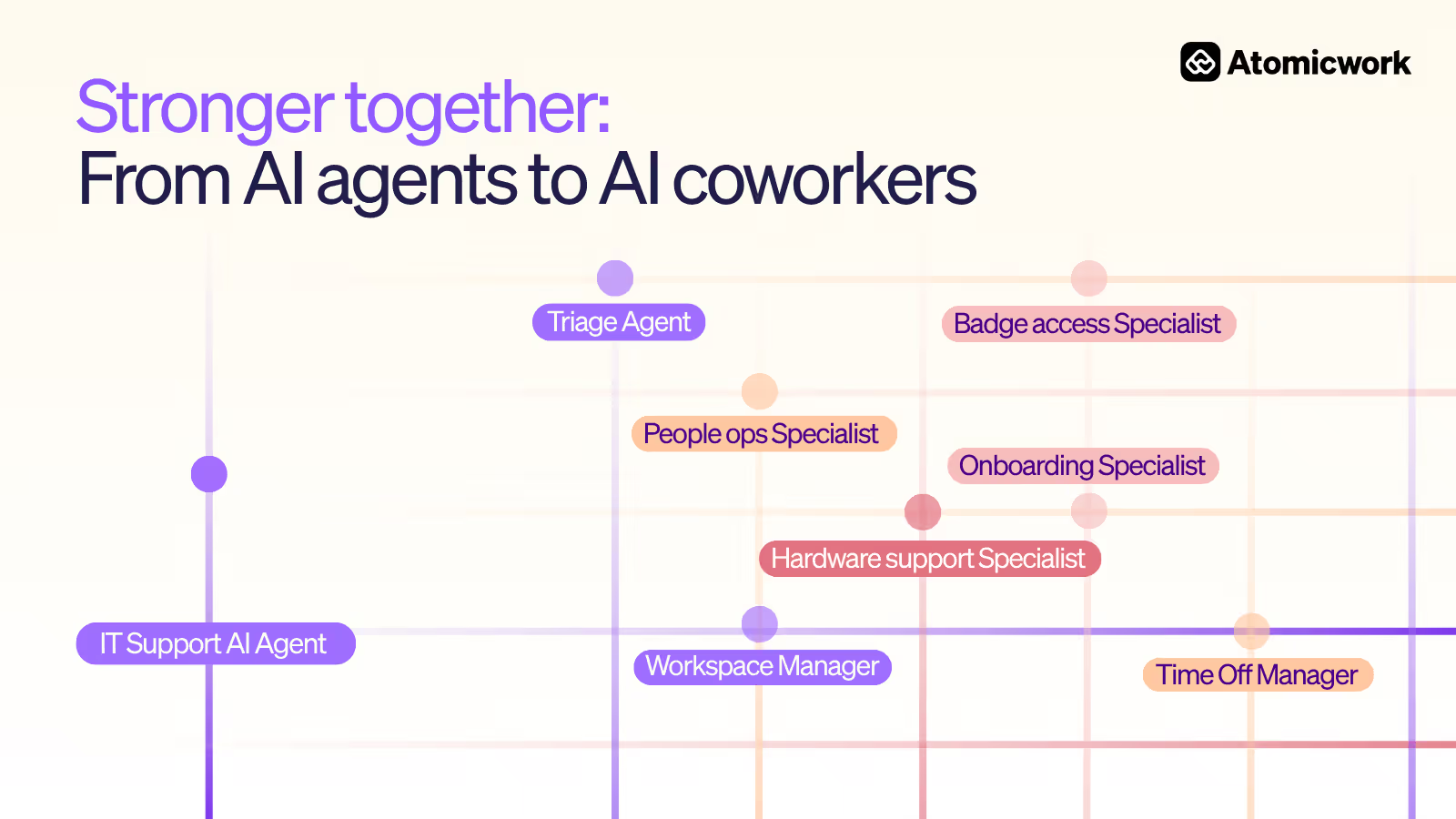
Let’s take the same onboarding example. The Triage Agent receives "Onboard Jane Lee" and understands this isn't a single task but a job that spans departments. The agent then:
- Routes the ticket to an Employee Onboarding Agent that operates like an actual onboarding coordinator would
- Onboarding agent decomposes the ticket into 3 requests across IT, HR, Facilities workspaces
- Routes one request to the People Ops Specialist in the HR workspace for an employee profile setup
- Routes another request to the Hardware Support Specialist in the IT Support workspace for asset provisioning
- Routes the badge request to the Badge Access specialist in the Facilities workspace
- Links all three requests together so progress in one is visible to the others
- Maintains context across the whole process so that if the laptop shipment is delayed, it can flag that to the hiring manager and adjust the first-week schedule

That’s three linked requests across multiple systems targeted at one coordinated outcome. The system even explains its own reasoning: hardware and badge workspaces aren't visible from People Ops, so cross-workspace routing goes through the Global Workspace Manager rather than picking specialists directly.
And, the AI coworker can do so because it behaves differently from an AI agent. Its access and identity persist across systems, retains memory and context longer, and collaborates seamlessly between agents (and humans) to complete the job at hand.
The AI coworker isn't operating in a separate system with separate rules. It's working inside the same service management infrastructure, governed by the same constructs.
Every dimension you use to manage humans now applies to the AI workforce
This is where an AI coworker differs significantly from a well-configured AI agent. An AI coworker gets managed across the same dimensions as a human team member:
- Identity: An AI coworker has a name, a service account, and an agent ID and exists in a directory to be discoverable, auditable, and revocable.
- Job role: AI coworkers are assigned job goals, a team, and a manager. The coworker reports to a manager agent that routes work to it.
- Skills: Similar to how employees build capability through training, certifications, and mentorship, an AI coworker builds capability through tools, knowledge bases, and finetuning. They are upskilled, scoped, and updated over time.
- Access control: An AI coworker is also governed by SSO, RBAC, and least privilege, so that they don’t go rogue and are always monitored.
- Lifecycle management: Humans are hired, onboarded, and eventually offboarded by orgs. An AI coworker is, similarly, configured, deployed, and eventually deprovisioned. You wouldn't leave a former employee's credentials active, and you shouldn't leave a decommissioned AI coworker's access live either.
- Collaboration: Protocols are defined explicitly on when to involve a human agent, how to escalate, and how to hand off across functions.
- Memory: Just like how employees retain institutional knowledge over time, an AI coworker retains context across past conversations, resolved issues, org-specific knowledge for self-improvement. An AI coworker's memory is, additionally, auditable, scopeable, and something IT needs to actively govern: what it retains, for how long, and who can review it.
- Budget: An AI coworker operates within token call limits and tool-call budgets, consuming resources within financial guardrails.
- Performance: AI coworkers are measured through evals and feedback loops as a mechanism for improvement when they underperform.
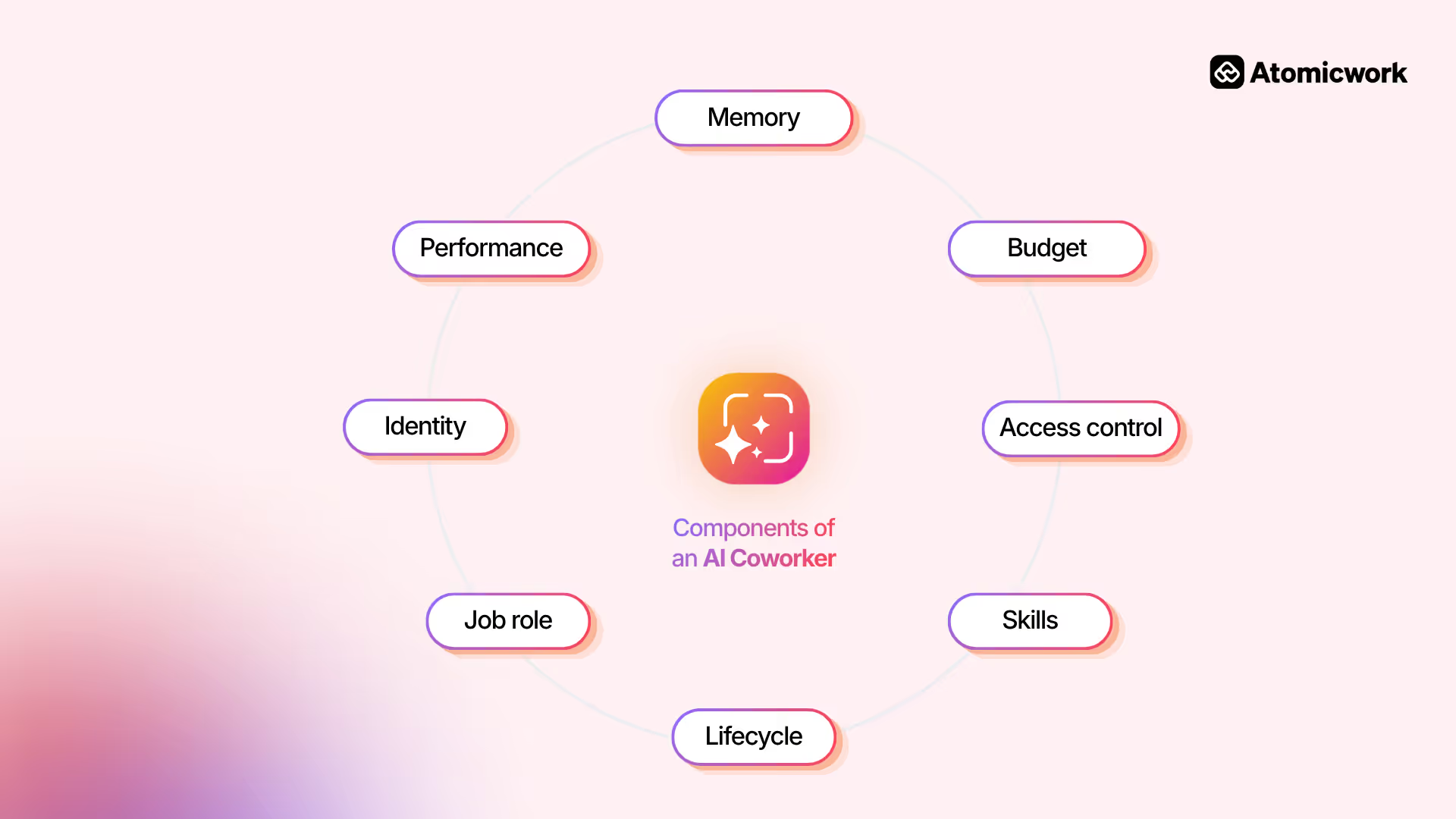
That's an employee profile but for AI!
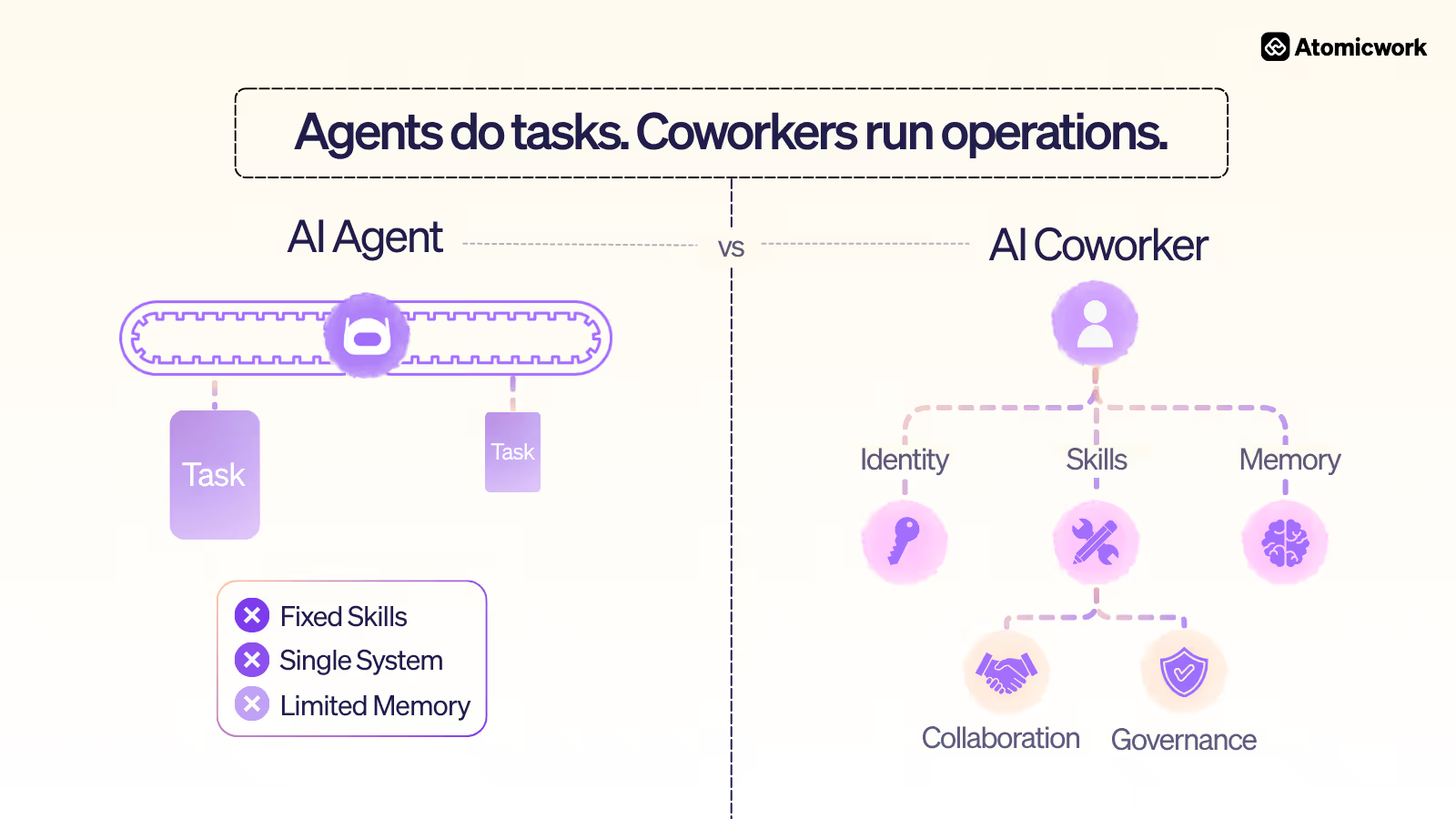
In a nutshell, the key differences between and AI agent and AI coworker are:
Why governance becomes the real question
If an AI system has persistent access to your identity provider, HRIS, ticketing system, and change management workflow, treating it as a standalone script is a governance gap, regardless of what you call it.
The data backs this up. Gartner's March 2026 Data and Analytics Predictions found that 50% of AI agent deployment failures will be due to insufficient governance runtime enforcement by 2030. The infrastructure to govern AI as a workforce member is moving into the mainstream, and organizations that don't build it now will have to retrofit it later under pressure.
If your AI has persistent identity, persistent access, and persistent scope, it needs to be governed like a workforce member.
Atomicwork calls this agentic service management, built around three areas:
- Know - A directory for identity
- Manage - Access management and governance for permissions
- Update - Change management for scope changes
It's the same service management infrastructure mapped to cover AI coworkers alongside human employees.
The next 18 months
That progression from a task-executing agent to a governed, autonomous coworker is where the value compounds.
The infrastructure question only gets harder to defer. Start with what IT already knows. Every dimension you already use to manage humans like identity, job role, skills, access control, lifecycle, budget, collaboration, memory, governance, performance — now applies to your AI workforce. That's the foundation everything else gets built on.
We’re happy to chat with you, if you’re looking to hire AI coworkers in your workforce. Schedule a slot with us :)
Frequently Asked Questions
1. What is the difference between an AI agent and an AI coworker?
An agent completes a task and exits. An AI coworker has an ongoing role, identity, access policies, and a reporting hierarchy. One runs on workflow config. The other runs on IT infrastructure.
2. Are AI coworkers replacing employees?
No. They handle routine, repeatable work so human employees can focus on work that requires judgment, relationships, and context.
3. How do you govern AI coworkers in an enterprise?
The same way IT governs human workforce infrastructure: a directory for identity, access management for permissions, and change management for scope changes. The constructs already exist. You're extending them to a new type of workforce member.
4. What's the difference between an AI coworker and an AI copilot?
A copilot assists. It needs human input at every step. An AI coworker acts autonomously, executes multi-step workflows, and reports outcomes without waiting for prompts.
5. How do you measure AI coworker performance?
Resolution rate, time to completion, accuracy, end-user satisfaction, and cost per outcome. Add escalation rate and compliance adherence on top of that.
6. What tools do I need to manage an AI workforce?
A platform with directory, access governance, and change management built for AI as first-class users. Legacy ITSM tools were built for human-only workflows and weren't designed for this. This is where AI workforce platforms like Atomicwork come into play.