
The ultimate IT onboarding checklist for modern enterprises

Mark has joined your sales team. First day, first hour, his laptop hasn't arrived, his email isn't active, and nobody told him how to raise a ticket. By noon, he's spent his entire first morning doing nothing productive. By the end of the week, he's decided this place isn't as organized as it looked in the interview.
I've seen this exact scenario plays out thousands of times across companies that know what good onboarding looks like but haven't built the systems to make it happen reliably. The problem comes down to execution at scale.
The hard part is making it happen consistently, every time someone new joins, without the whole thing depending on someone manually holding it together.
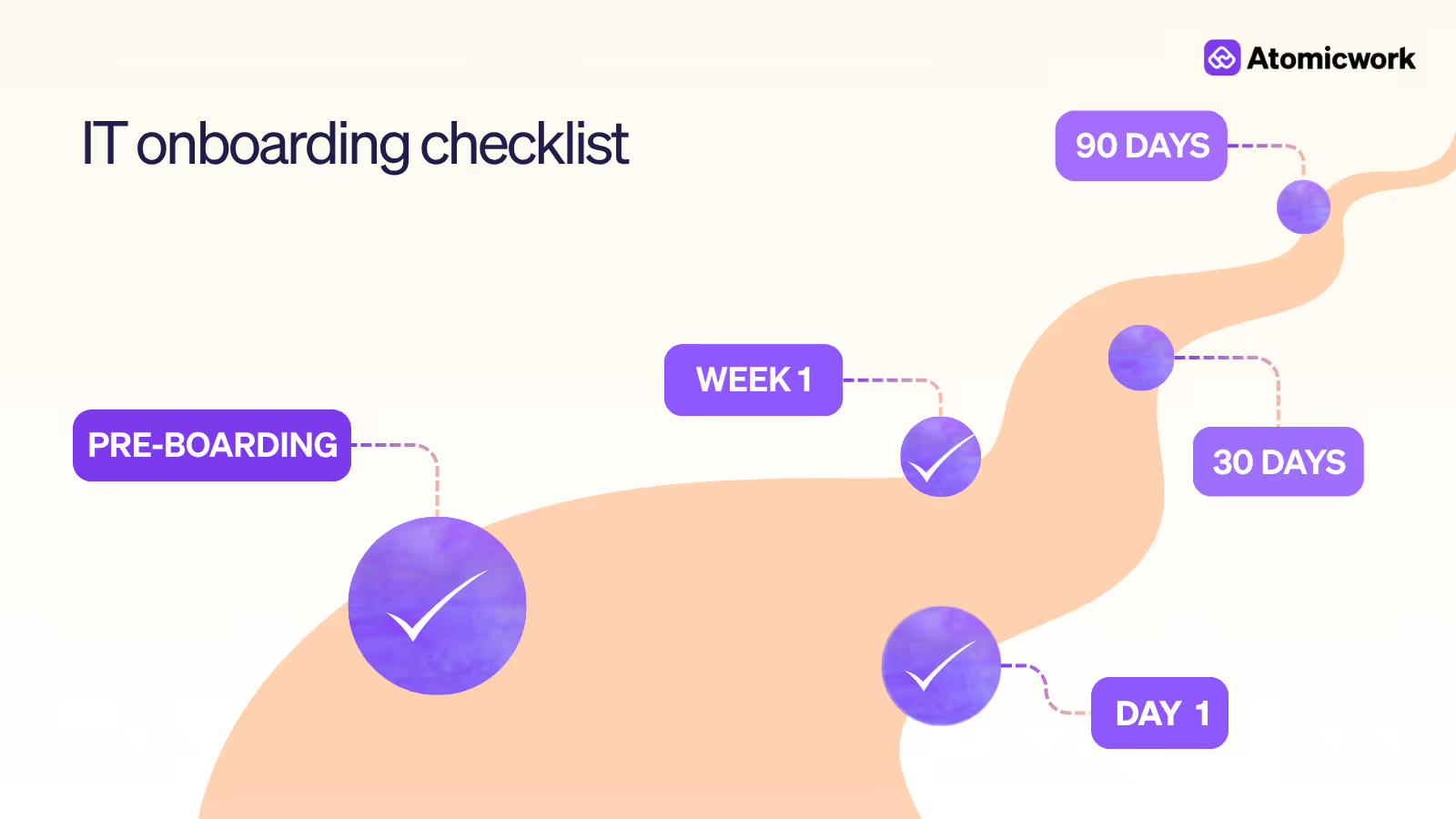
This checklist is what I use at Atomicwork: the full onboarding journey from the moment a contract is signed to the 90-day mark, when a new hire should be working autonomously without IT's help.
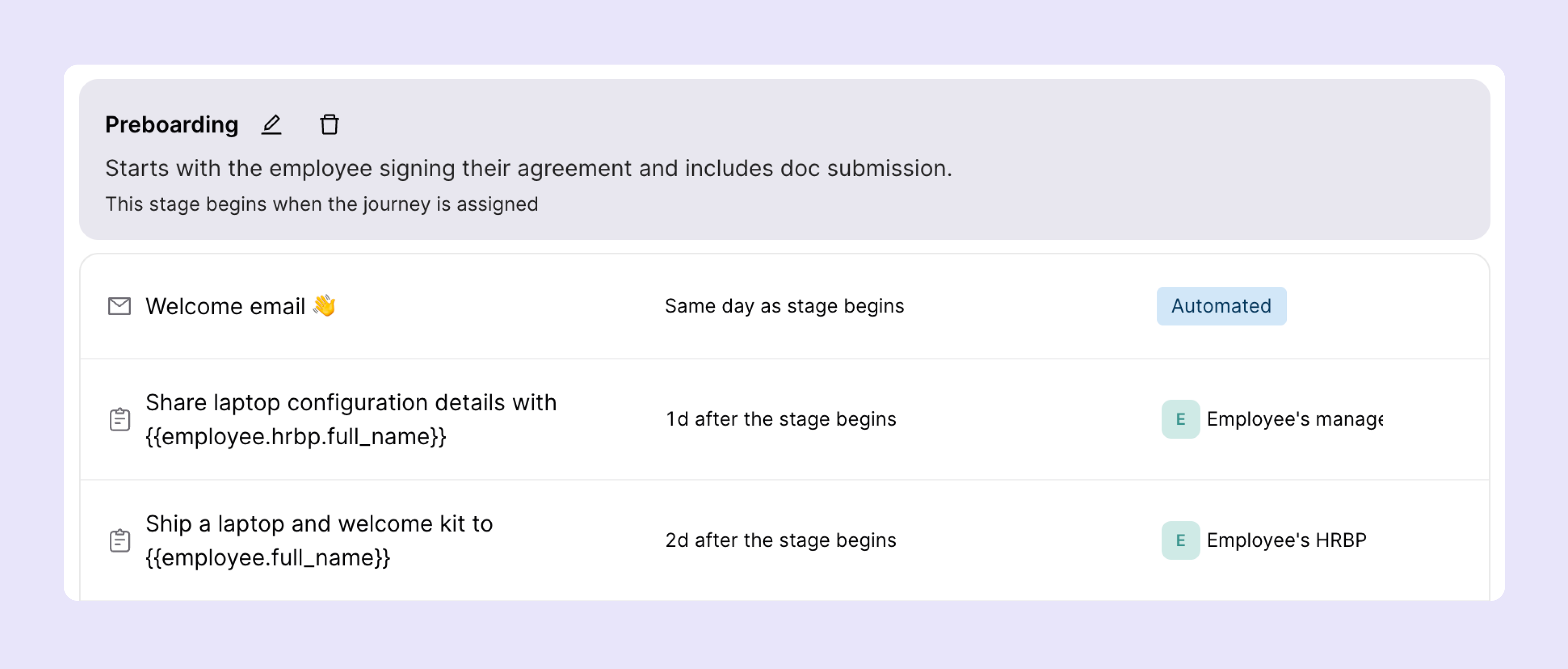
1. Pre-boarding checklist (1–2 Weeks before start date)
IT onboarding that begins on day one is already late. The most effective programs start the moment an offer is accepted, and not when the new hire walks through the door (or logs in remotely). A well-executed pre-boarding phase eliminates first-day friction that's entirely preventable.
The goal is simple: when the hire shows up on day one, everything should already work.
| # | TASK | TOOL / OWNER |
|---|---|---|
| 1 | Procure and configure hardware per role (laptop, peripherals, accessories) | IT / Procurement |
| 2 | Create corporate email account and calendar access | Google Workspace / M365 |
| 3 | Provision licenses for core tools (Slack, Jira, GitHub, etc.) | Okta / Entra SSO or similar tool |
| 4 | Apply role-based access permissions via identity groups | MS Entra / Okta or similar tool |
| 5 | Ship equipment to remote hires with tracking confirmation | IT / Ops |
| 6 | Send welcome packet with IT setup instructions and support contact | HR + IT |
| 7 | Pre-enroll device in MDM for zero-touch deployment | Intune / Jamf or similar tool |
| 8 | Assign onboarding buddy from IT or engineering team | IT Manager |
| 9 | Trigger provisioning workflow from HRIS on offer acceptance | ITSM + HRIS integration |
💡Pro tip: Automated provisioning triggers directly from your HRIS. When an offer is accepted in Workday or BambooHR, a workflow can kick off the entire provisioning sequence: hardware request, account creation, license assignment without a single IT ticket being raised manually.
Why this matters: Manual provisioning creates unnecessary delays, IT overhead, and a poor first impression that's hard to undo.
2. Day-one IT setup checklist
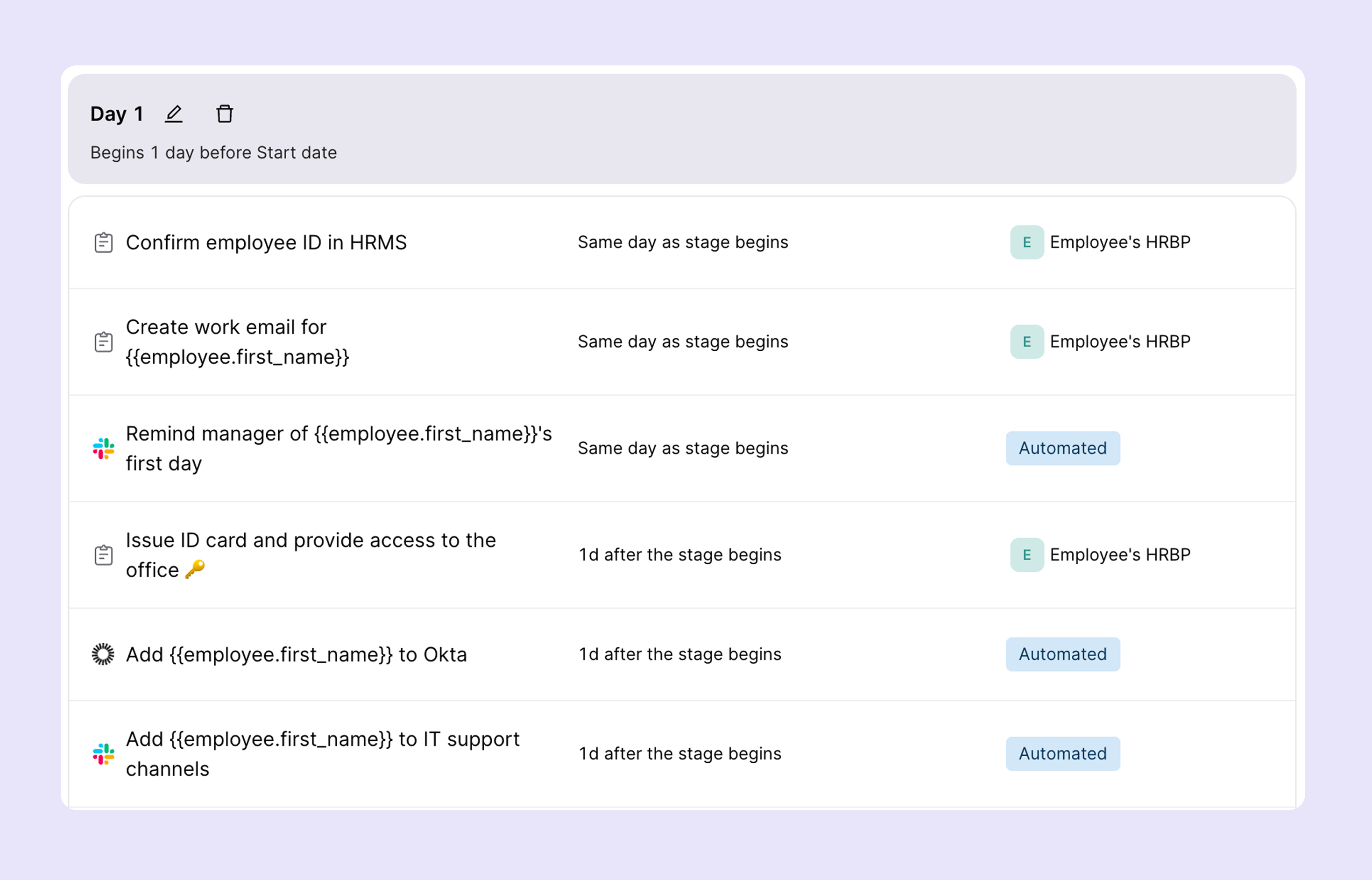
Day one is a high-stakes moment. A broken setup, say, accounts that don't work, a laptop that isn't configured, or MFA that no one walked the new hire through is costly in two ways: it kills productivity immediately, and it signals organizational dysfunction. Obviously, neither is acceptable.
The day-one checklist is about confirming that everything provisioned in pre-boarding actually works, and that the new hire knows how to use what they've been given.
| # | TASK | TOOL / OWNER |
|---|---|---|
| 1 | Laptop powered on, configured, and ready (at desk or shipped and received) | MDM / IT |
| 2 | Corporate accounts active — email, Slack, calendar, VPN | Google / M365 / Okta or similar tool |
| 3 | Multi-Factor Authentication (MFA) enrolled and verified | Duo / Entra MFA or similar tool |
| 4 | VPN configured and tested for remote access | Cisco / Tailscale / Cloudflare or similar tool |
| 5 | Communication tools accessible (Slack, Teams, Zoom) | IT check |
| 6 | Printer and peripheral setup (office-based hires) | IT |
| 7 | Badge / physical access provisioned for office hires | Facilities / IT |
| 8 | Walkthrough of IT support channels and how to raise a ticket | ITSM platform |
| 9 | New hire completes IT self-service orientation | AI-assisted onboarding agent |
💡Pro tip: We use dynamic employee groups to auto-provision apps and devices based on role, department, and location. A sales engineer in Singapore gets a different configuration than a backend engineer in Bengaluru, automatically, with no manual differentiation required from IT.
Common pitfall: MFA is the most frequently skipped item on day-one checklists, especially when the new hire is remote and doing self-setup. Make enrollment mandatory before any other accounts are accessible.
3. First-week training & access verification
Getting someone logged in is the beginning of onboarding. The first week should confirm that the new hire can access every system their role requires, understands key workflows, and has had permissions audited against the least-privilege principle.
This is also when the first compliance and security training happens. It must be structured and tracked as part of their first five business days.
| # | TASK | TOOL / OWNER |
|---|---|---|
| 1 | Verify access to all role-specific applications and systems | IT / Manager |
| 2 | Walk through key IT workflows (file sharing, ticketing, approvals) | ITSM platform |
| 3 | Confirm permissions are scoped correctly (least-privilege audit) | MS Entra / Okta or similar tool |
| 4 | Complete cybersecurity awareness training module | KnowBe4 / Proofpoint or similar tool |
| 5 | Review data classification and acceptable use policies | GRC platform / HR or similar tool |
| 6 | Introduction to IT support escalation paths | IT ticketing |
| 7 | Share full training schedule upfront — no surprises | HR / IT |
| 8 | Confirm all outstanding access requests are resolved | IT Manager |
💡Pro tip: Share the full first-week training schedule on day one so nothing feels ad hoc. Transparency reduces anxiety for new hires and signals that the organization is well-run. When people know what's coming, they prepare better and resist less.
On least-privilege: Every user account should have only the access they need for their role, and nothing more. Over-provisioning is as dangerous as under-provisioning. A marketing manager with read access to the production database is a misconfigured account waiting to become a security incident.
4. BYOD & personal device requirements
Bring Your Own Device policies create real security risk when they're vague, inconsistently enforced, or rely on employee self-compliance. At the same time, a blanket 'no personal devices' policy is impractical for many organizations, especially remote-first ones.
The right approach: clear, documented standards with MDM enrollment as a non-negotiable prerequisite before any personal device touches corporate data.
| POLICY AREA | ATOMICWORK STANDARD |
|---|---|
| MDM Enrollment | Mandatory for any device accessing corporate data — no exceptions |
| Minimum OS Version | iOS 17+ / Android 14+ / macOS 14+ / Windows 11 |
| Encryption | Full-disk encryption required (FileVault for Mac, BitLocker for Windows) |
| Corporate Data Handling | Containerized — no corporate data on unmanaged partitions |
| Remote Wipe Capability | IT retains ability to wipe corporate container on device loss or offboarding |
| Policy Acknowledgment | BYOD policy documented and signed before day one — no exceptions |
Recommended tools: Intune (Microsoft Endpoint Manager) and Jamf are the leading MDM platforms for enterprise BYOD management. Jamf is stronger for Apple-first environments; Intune is the default choice for Microsoft-centric organizations. Both support containerization to separate personal and corporate data on the same device.
A note on enforcement: The BYOD policy only works if it's a precondition for access, and not something you try to enforce retroactively. Build the acknowledgment into your pre-boarding flow so it's signed before the first account is provisioned.
5. Shadow IT prevention & approved tool policies
Shadow IT is the set of tools, apps, and services that employees use without IT's knowledge or approval. It's a real and growing problem in most organizations, and it's almost never malicious in intent. People adopt unapproved tools because approved ones are too slow to provision, too hard to use, or simply not good enough.
Effective shadow IT prevention requires a two-pronged approach: make approved tools genuinely frictionless to access, and clearly communicate why unapproved tools are a risk.
The four pillars of shadow IT prevention:
- Approved tool catalog: Every new hire receives a clear, accessible catalog of approved tools organized by function: file sharing, project management, communication, design, analytics, development, and more. This should be a living document, not a PDF that's six months out of date.
- Risk communication: During onboarding, explain the specific risks of unapproved tools: data leakage, compliance gaps, no SSO or audit trail, inability to enforce security policies, and vendor due diligence failures. Make it as concrete as possible. Do not keep it abstract.
- Frictionless provisioning: By integrating SSO and app management into a single platform, provisioning approved tools should be near-instant. If getting approved software takes a week of tickets and approvals, people will go rogue.
- Lightweight request process: Employees should be able to propose new tools through a simple request workflow rather than adopting them silently. IT evaluates security, compliance, and overlap with existing tools before approving. The process should take days, and not stretch to months.
💡Pro tip: Shadow IT is a symptom of poor tooling experience, not malicious intent. If the gap between 'I need this tool' and 'I can use this tool' is measured in weeks, people will close that gap themselves. Fix the provisioning experience first.
| # | Task | Tool / Owner |
|---|---|---|
| 1 | Share approved tool catalog with new hire on day one | IT / internal wiki |
| 2 | Explain shadow IT risks during onboarding orientation | IT Security |
| 3 | Confirm SSO is configured for all approved tools | Okta / Entra or similar vendor |
| 4 | Document the tool request process and where to find it | ITSM platform |
| 5 | Set up shadow IT detection scanning (recommended) | Netskope / Zscaler or similar vendor |
6. AI tool governance guidelines
AI tool governance is the most frequently missing section of corporate onboarding programs right now. The average knowledge worker has access to dozens of AI tools, some company-provided, most not, and most organizations have no clear policy on what's approved, what's restricted, and what constitutes a data policy violation.
This gap is a huge compliance and IP risk. Every new hire should review and acknowledge an AI usage policy as part of their first-week training. The more specific the policy is, the better it is.
Why this matters now: A recent Gartner survey of ~300 cybersecurity leaders says that 69% of organizations 'suspect or have evidence' that employees are using prohibited public GenAI or shadow IT, in other words. Most do it without realizing they were violating policy. A clear, acknowledged AI governance policy reviewed during onboarding closes this gap before it becomes an incident.
| Governance Area | Policy |
|---|---|
| Approved AI Tools | Clearly listed; all others prohibited without IT approval |
| Data Restrictions | No PII, customer data, source code, or confidential information in external AI tools |
| Internal AI Platforms | Company-provided AI tools with data governance and audit logging built in |
| AI-Generated Output | Must be reviewed before use in client-facing or regulated contexts |
| Compliance Alignment | AI usage logged and auditable; aligned with SOC 2, GDPR, and applicable regulations |
| Policy Refresh Cadence | Reviewed and updated quarterly as the AI landscape evolves |
7. Cybersecurity & compliance training
Security training that happens three months after someone starts is security training that's too late. All cybersecurity modules should be completed within the first five business days. More importantly, the completion should be tracked and reported to management, not self-attested.
New hires are navigating unfamiliar systems, learning new workflows, and building relationships with colleagues they don't yet know well. These are the exact conditions that make social engineering attacks more likely to succeed.
| # | Task | Tool / Owner |
|---|---|---|
| 1 | Phishing recognition and simulated phishing exercise | KnowBe4 / Proofpoint or similar tool |
| 2 | Password hygiene and password manager setup | 1Password / Bitwarden or similar tool |
| 3 | MFA configuration and best practices | Duo / Microsoft Authenticator or similar tool |
| 4 | Data classification framework (Public / Internal / Confidential / Restricted) | GRC / HR |
| 5 | Acceptable use policy review and signed acknowledgment | HR / Legal |
| 6 | Incident reporting procedures and escalation paths | IT ticketing |
| 7 | Industry-specific compliance training (SOC 2, GDPR, HIPAA as applicable) | Compliance platform |
| 8 | Secure remote work practices (VPN, public Wi-Fi risks, home network setup) | IT Security |
💡Pro tip: All cybersecurity training must be completed within the first five business days. Completion is tracked in the ITSM platform and flagged to the manager's dashboard if overdue. Training is not self-reported, completion is verified via the training platform's API.
Compliance note: For organizations subject to SOC 2 Type II, HIPAA, or ISO 27001, training completion records are auditable evidence. Hence, you must automate the tracking. Don't rely on spreadsheets or manual follow-up.
8. Identity management integration
A fragmented identity architecture is the root cause of most provisioning delays, access review failures, and offboarding gaps. The goal should be a single source of truth, one authoritative directory that all downstream systems sync from, automatically.
For most enterprise environments, that means MS Entra or Okta (Azure AD) at the center of a connected identity architecture.
Core principles:
- Single source of truth: MS Entra (or similar tool) serves as the authoritative directory. All downstream systems: SSO, MDM, SaaS apps sync from this source. Manual account creation in individual apps is a red flag.
- Least-privilege access: Grant only what the role requires. Default to minimal permissions and expand based on verified need, not requests alone.
- Automated provisioning: When a hire is recorded in the HRIS, accounts, group memberships, and app access are created automatically. No manual IT tickets and certainly no human bottlenecks.
- Periodic access reviews: Quarterly reviews to ensure permissions remain appropriate. Stale access, permissions granted during onboarding that are no longer needed, is a persistent vulnerability.
- Automated deprovisioning: When someone leaves, all accounts and access are revoked immediately.
Reference architecture: HRIS (Workday / BambooHR) → MS Entra → SSO (Okta / Entra) → SaaS Apps + MDM + VPN.
- Every change in the HRIS flows downstream automatically.
- No manual handoffs.
- No orphaned accounts.
| # | Task | Tool / Owner |
|---|---|---|
| 1 | Confirm hire is recorded in HRIS and has triggered provisioning workflow | HRIS + ITSM |
| 2 | Verify Entra / Okta group membership reflects role and department | MS Entra / Okta |
| 3 | Confirm SSO is working for all provisioned applications | IT check |
| 4 | Validate MDM enrollment synced from identity provider | Intune / Jamf |
| 5 | Document account creation in audit log with timestamp | SIEM / Entra logs |
| 6 | Set access review reminder for 90-day mark | Automated workflow |
9. 30/60/90-Day IT follow-up cadence
Onboarding must have a structured follow-up cadence. This ensures new hires are fully productive and that IT access remains appropriate as their role evolves. The 30/60/90-day model provides natural checkpoints for different kinds of verification.
Days 1–30
- Confirm all access and tools are working correctly
- Resolve any outstanding provisioning issues
- Verify cybersecurity training completion (5-day deadline)
- Collect initial feedback on the IT onboarding experience
Days 31–60
- Review tool utilization. Are they actively using what was provisioned?
- Identify IT skill development needs (tool training, advanced workflows)
- Assess whether additional access or tools are needed for the role
- Check for any security policy compliance gaps
Days 61–90
- Full autonomy assessment. Can they work without IT support for routine tasks?
- Revoke any provisional access no longer needed
- Administer formal IT onboarding satisfaction survey
- Transition from onboarding support to standard IT support tier
💡Pro tip: Schedule these check-ins automatically in your ITSM platform. Set triggers at 30, 60, and 90 days from hire date to generate tasks, surveys, and access review requests. Manual calendar reminders will get missed.
10. Contractor & vendor onboarding
Contractors and vendors present a distinct set of IT risks. They often need scoped, time-limited access to internal systems without the full identity footprint of a full-time employee.
Many organizations treat contractor onboarding as a lighter version of employee onboarding. That's a mistake. Contractors need a structured track that's different in kind, not just lighter in scope.
💡Pro tip: Never reuse a former contractor's account for a returning contractor. Always create a fresh identity. Reusing accounts breaks audit integrity and creates compliance exposure, especially under SOC 2 and GDPR, where clear user attribution is required for access logs.
For vendors with ongoing system access (managed service providers, SaaS vendors with admin access to your environment), apply Privileged Access Management controls. There are tools to ensure that privileged sessions are recorded, time-limited, and subject to approval workflows.
11. Measuring IT onboarding success
The mantra is: What gets measured gets improved. Most IT teams can tell you how many tickets they closed this week, but can't tell you how many tickets were generated by new hires in their first 30 days, or what their average time-to-productivity is. These are the metrics that matter for onboarding.
Pro tip: Track metrics by cohort, say, monthly hire groups, to identify trends and measure the impact of process improvements over time. A metric that looks fine in aggregate may reveal a specific month where provisioning delays spiked, pointing to a specific process or tool failure that's otherwise invisible.
Use these metrics to build a quarterly onboarding review with HR and IT leadership. Show the data, identify the friction points, and make the case for automation investment. The ROI is concrete and measurable.
| Metric | What It Measures | Target |
|---|---|---|
| Time-to-Productivity | Days until new hire is fully independent and productive | < 30 days |
| Help Desk Ticket Volume | IT tickets raised by new hires in their first 30 days | < 3 tickets |
| Security Incident Rate | Security incidents among hires in first 90 days | 0 incidents |
| Training Completion Rate | % completing all modules within 5 business days | 100% |
| Satisfaction Score | Employee survey at 30-day and 90-day marks | > 4.5 / 5.0 |
| Provisioning Accuracy | % of accounts/licenses correctly provisioned on day one | > 99% |
| Retention (90-day) | % of new hires remaining after 90 days | > 95% |
Build it once. Run it every time.
IT onboarding done well is a repeatable system as it is automated, auditable, and continuously improved based on data. The investment in getting it right pays back every hire cycle in reduced IT overhead, lower time-to-productivity, and a materially better employee experience.
The checklist in this guide is a starting point. Adapt it for your team, automate what you can, and measure what matters. The organizations that treat onboarding as a system are the ones consistently getting new hires to full productivity in under 30 days.



Frequently asked questions

%20(1).avif)

